VPNBOOK – OpenVPN – How to set up OpenVPN on Windows 7
Imagine that you’re travelling overseas, or the government are playing with the DNS to stop access to your favourite websites, what could you do? Well the solution is to use OpenVPN to bypass all government restrictions. VPNBook offer connections using Port 80 to sidestep firewalls or state regulation.
When you’re in the Middle East, or a country that disapproves of social media (eg China disapproves of Facebook and Google), use OpenVPN, which takes all of 2 or 3 minutes to install. Coupled with VPNBook’s VPN certificate for Port 80, you can bypass firewalls, as most firewalls allow web traffic.
Why is OpenVPN Recommended compared to VPN’s in Windows 7?
- * Faster VPN
- * More Secure VPN – AES 256 Encryption
- * Stops DNS Leaks from Windows operating System
- * Bypasses all Firewall restrictions
- * Bypasses government restrictions
- * It’s bulletproof.
- *No government restrictions can suspend Port 53
To Install OpenVPN – takes 2 or 3 minutes to install
1) Download the OpenVPN software from http://openvpn.net/index.php/open-source/downloads.html. You need the “Windows Installer”.
2) Once the file is downloaded, right click the file to start the install process, then “Run as administrator“. Note for Vista and Win 7 users, you need to install OpenVPN as administrator.
3) Click “Next” and then agree to the Terms of Service.
4 ) You’ll see “License Agreement”
5) Have all components selected (make sure all have checkmarks) and the click “Next“.
6) Choose install path – this will be c:\ProgramFiles\OpenVPN
Now click “Install“.
In the security window that pops up select “Install“.
8) Installation Complete Screen.
Click “Next“.
9) Click “Finish“.
*****
Extra information on using Winzip to download the certificate are here, if you haven’t used Winzip before.
*****
Now we install the Certificate to connect to VPNBook on Port 80 (Needs Winzip)
STEP 1 - download the Certificate for TCP Port 80 access.
- Go to www.vpnbook.com
- OpenVPN Tab.
- Download Server OpenVPN Bundle.
STEP 2 – DOWNLOAD THE OPENVPN CERTIFICATE (UNZIP)
Download OpenVPN certificate bundle and unzip it
3) Unzip the certificate file.
STEP 3 – Copy the .ovpn files to c:\ProgramFiles\OpenVPN\config
Extract the files to c:\ProgramFiles\OpenVPN\config or copy them to this directory.
**EDIT MAY 2013 – VPNBook bundles now include only include the .ovpn files. I’ll explain this a little later on.
4) If you don’t know how to use Winzip, don’t worry, we can use cut and paste instead. We can use Windows Explorer – Copy the .ovpn files, Navigate to “c:\program files\OpenVPN\config” and paste the .ovpn configuration files you just downloaded into this directory.
Note for standard OpenVPN this would be 2 files. (vpnbook.crt was the old security certificate). This is important if you’re an experienced VPNBook user – as you’d be flummoxed wondering where this .crt file has gone. It’s been integrated into their newer .ovpn files.
Step 5 – Connect to OpenVPN.
5) Right click on the OpenVPN icon in the system tray (lower right hand corner of your screen), and select “Connect” from the menu.
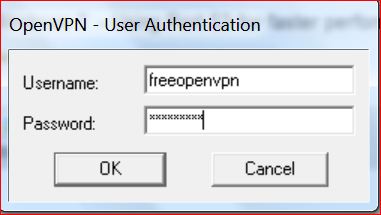
6) Enter your VPNBook user name and password into OpenVPN (these are obtained from http://www.vpnbook.com).
-
Username: vpnbook
-
Password: adv7ebeh
-
Click “OK“
7) Connected log appears – Congratulations… you are now running a VPN using Port 80.
As OpenVPN is connecting the log will fill with information. This is normal. Once completed you will be connected to your new VPN!
Congratulations! Your connection is now ready to use!
Select “Disconnect” when you are ready to end your session – but lets test that you are running a Romanian IP first.
********
To Test that you’re running on a Romanian IP – and get a pretty Romanian Flag
Click on this link: www.dnsleaktest.com
*******
Where to find the OpenVPN icons…to launch it next time.
- Right click the desktop icon and select “Run as Administrator”.
- System tray (on the bottom, by the clock). Right click the icon, vpnbook-udp53, connect.
- Start > All Programs > OpenVPN > OpenVPN icon (2 terminals and a planet Earth icon)
- Notice the colour of the terminals. Red terminals = not logged on. Yellow terminals = awaiting passwords. Green terminals = connected and working okay.
Why is OpenVPN Recommended compared to VPN’s in Windows 7?
- * Faster VPN
- * More Secure VPN
- * Stops DNS Leaks from Windows operating System
- * Bypasses all Firewall restrictions
- * Bypasses government restrictions
- * It’s bulletproof.
Excellent tutorials for setting up OpenVPN on Mac, Vista and Linux are here: http://www.foxyvpn.com/tutorials/
My thanks to VPNbook.com. Good luck with the community project, and I hope you get lots of donations to buy new servers. Thanks for offering such a great service, which is free, and allows everyone to learn how to use a VPN:)
Things you might want to do next:
How to Automate your login to VPNBOOK with OpenVPN
https://uwnthesis.wordpress.com/2012/11/27/vpnbook-openvpn-how-to-insert-the-password-automatically/
Which is the Safest VPN on the Market? What do I do?
How to run OpenVPN with administrator rights
https://uwnthesis.wordpress.com/2013/03/25/how-to-run-openvpn-with-administrator-rights-windows-7/
IVPN – The VPN which server logs every 10 minutes (a thousand times every week)
https://uwnthesis.wordpress.com/2013/03/07/ivpn-with-10-minute-log-deletion/


The first option returned an error when I put this line in the config file: ip-win32 netsh
So I tried the second and .. it worked!!!
Thank you very very much uwnthesis you really do an outstanding work in this blog.
Thanks!
YAY!!!
YES!!!
Happy dance. WOOHOO!!
Thanks for the info and the setup guide.
May I know that is there a way to “pre-enter” the username and password instead of enter the username and password manually every time after clicking connect?
Thank you.
Hi JL,
Yes, there’s a nice easy way to automate your login.
https://uwnthesis.wordpress.com/2012/11/27/vpnbook-openvpn-how-to-insert-the-password-automatically/
Thank you for leaving a comment – it’s so nice to hear from everyone
Hi Uwnthesis, thank you, your guide is so great!!
Btw, I did not put auth-user-pass password.txt at the last line but adding password.txt at the line where auth-user-pass already exists there, and it works~
Hi Uwnthesis, your tutorial seems the most self explained i have ever seen.. Please is it posible to use a u.s.a ip on openVPN instead Romania ip? Im just confused. If yes please elaborate on the processes involve… Thanks.
Hi Scott,
The Romanian exit node has been selected for legal reasons. Romanian courts recently struck down the EU’s Data Retention laws – as a breach of privacy.
In the US, data logging isn’t mandatory, BUT if they do have server logs, those logs can be seized under both FISA (Foreign Intelligence Surveiliance Act) and the Patriot Act.
Therefore European Data protection laws give you greater rights.
VPNBook have no exit nodes in the US – as any company which operates a satellite office in the US, comes under FISA/Patriot Act. Therefore many EU companies would avoid an US based enterprise.
If you can afford it – $100 a year, then have a look at signing up with http://www.IVPN.net. They delete their server logs every 10 minutes.
They have multi hop options – and many are across the US. So to give an example of how this works; a prosecutor would have to get a court order and serve it against IVPN in Malta, in order to seize the server logs in Texas, all within 10 minutes.
IVPN offer:
CA – TCP
CA – UDP
TX – TCP
TX – UDP
Hope that helps you
Hate to bother you again but vpnbook and openvpn just don’t seem to work for me. I tried port 53 and another but both times they failed to change my ip. After few tries, the service fails altogether. Without openvpn it seems to work fine. Wonder why that happens…..
Hi Dan,
Glad to help out.
What errors are you getting? That helps me sort out the problem for you.
Go to OpenVPN icons (Amber or green), right click > view log
Can you see any errors.. like TLS timeout for instance?
Well, it warns that “no server certificate verification method has been enabled, openvpn 2.1 requires script security 2 or higher to call user-defined scripts and executables” and then fails. Initially, though, it seemed to work (light turned green) and assigned ip, but when checked correct ip was identified, so does it hide anything? Btw, do you know anything about supposed vpn service named Images! (the punctuation isn’t mine)? Regardless, thank you for the interesting subjects and detailed overview. Keep up the good work! (this time “!” is intended)
The server cert error we can ignore, as I even get that with paid VPN’s. The light turning green is a great start – it means that you’ve been authenticated by VPNBook, so we have connectivity and the right password.
There is something called a DNS leak. If you got to http://www.dnsleaktest.com – it will show you the IP you’re on probably Romanian.
Windows is leaky. She likes to be lazy and use the nearest DNS she can remember… you’d need to flush the dns for that.
You are on a Romanian IP, and your logs are being deleted.. so it’s all good news.
But it’s lazy windows programming which causes the DNSleak, and it happens with most VPN’s, and it’s much worse on the PPTP rather than OpenVPN.
Is this what’s happening for you? If it is, then you have connected fine, and your IP has been cloaked.
Glad you like the blog- the comments cheer me up no end. That’s my main aim – to get everyone onto VPN’s and to stop data collection/Retention. Schneier calls data collection the most dangerous cyber threat – it’s far more dangerous than Cyberwar or crime. So if we can thwart the data collectors, then I’ve succeeded.
I’ve not heard of Images. My advice would be the same for all VPN’s.
1. Ask do they keep logs (connection, server, traffic logs).
2. How long do they keep them. Telco’s like Swiss VPN keep them for 6 months. Logemin resell them. WHAT!! Hidemyass will give the logs to the police. Deal with VPN’s that focus on privacy and server log deletion.
3. Make sure they delete server logs – every day or sooner. VPNbook delete them after 3 days.. I’m be happier with 24 hours maxium.
No problem for the help. Any time.:)
Hello,
I’ve connected and DNSleaktest recognizes me as coming from the Romanian server, but it still has my US ISP DNSs listed. In case I’m not concerned at some point in the future or I need a faster connection, is it wise to leave these installed? I’m not a network expert and would like to know how to have the US fallback in case I have trouble with this service.
Thanks.
Hi ford prefect
YAY!!
You’ve done everything perfectly.
The dnsleak is the fault of Windows… it’s a lazy operating system. Only your ISP is being revealed, and you can flush the cache to stop this.
http://www.dnsleaktest.com will show you how to do this.
basically it’s type into a command prompt ipconfig /dnsflush
For your choice of future VPN, always use a VPN operator outside of your own country (so that US court orders do not apply to them).
You can use companies such as http://www.ivpn.net – who offer UK, US, Netherlands and multihop techology. This means you can use a single hop, which is faster, or route via 3 countries.
That means that no single court order can be obtained within 10 minutes – in 3 separate jurisdictions.
And if one was obtained, at most they’ll get say 3 or 4 minutes worth of evidence…. but it’s virtually impossible to get even to the court order stage before all logs are wiped.
Most paid for VPN providers provide a very easy to install version of OpenVPN, that’s preconfigured.
The installs will be easier, as they’ll be set for that VPN.
You’ll also get a special key – that’s secret between you and the vpn server.
You don’t have that currently, as Openvpn don’t offer it. But it gives AES256 encryption of your connection.. that only the server and your certificate understand. This special and secret key, gives ultimate security. It’s injected into the SSL handshake… so that the secret key identifies you to the server. This secret key can be used on routers, so that you’ll see “tomato” routers using this master key.
Always check how fast your VPN provider will delete the server logs. Look for at least every day for your own security.
Thanks for leaving a comment. It always makes me smile, to see technology working as it should.
I owe my exploration into VPNs to this post and I thank you! I first used VPNBook and recently ordered a month of service from privateinternetaccess.com. PIA is located in the US but they do not keep any logs (because the US laws don’t require it) and have come very highly recommended. I usually use their servers in Canada (they offer them in Romania, Netherlands, Sweden, US, and others) and usually get around 10mbps and max of around 22 mbps sometimes (my connection is 25). The best part is that a year of service is only $40. After a couple weeks it looks like I’ll renew for a year at the end of the month and pay in bitcoins.
So thank you guys for upkeeping this post and being so helpful for us noobs! I also have a question I’m sure you can answer. Since my ip is hidden behind PIA, would it be okay to torrent on the US servers they have (I live in the US and get better speeds on them)? They also have a free SOCKS5 proxy for torrents, what are your thoughts on this kind of service?
Hi Tim,
The answer to that depends on how your VPN provider feels about it.
Some VPN providers, like BTGuard, are pro torrenting and assume that you will be file sharing.
Others allow p2p protocols on their servers based in say France, or the UK, but not their US servers.
This protects you. The heavy fines for file sharing are from the US.
However, I’ve seen estimates that 35% of the entire Internet is file sharing traffic. That’s the lowest estimate.
The general estimate is that 65% of the Internet is file sharing traffic, and the highest estimate was 80%.
So I’d say that US corporations have lost this battle, but don’t want to admit this to themselves.
Therefore, see what the VPN operator says about file sharing, and take it from there. If they’re willing to ignore it, then you’re fine. Just make sure they delete their logs every 24 hours or more often… or keep no logs. You might see this called “connection log”, traffic log, or server log. Make sure none are kept, or are deleted within 24 hours… to keep you safe.
Thanks for leaving a comment – it’s wonderful to hear that you’re using a VPN due to my little blog. My entire aim, was to get you on a VPN.
You’d made me one happy bunny
uwnthesis
This is probably the most awesome tutorial/article/site/whatever that I’ve seen in a long time. A friend pointed me to it when I was trying to find out some info on using a VPN on my PC. And your directions were great. I got it set up on there and it seems to be working as it should. This was a week or so ago so I apologize if my info seems outdated. But I even set up that text file so I didn’t have to enter the username and password everytime. I felt smart. Haha. So thanks very much.
I was wondering if I may be able to ask a question. Or more likely, whether you’ll answer it. Since doing this on my PC, I’ve looked into using a VPN on my mobile phone. Or at least I’ve tried looking into it. Its a Galaxy S3. I’ve tried every search I could possibly think of and have found some info but almost all of it involves using a VPN service (would that be the right term?) that costs monthly fees AND is located in the US. Which, at least to me, seems to kind of defeat the purpose. I can understand the fee thing. However your method seems much better.
Anyways, I guess my question would be is this something that can (or even should) be done on a mobile device such as a phone or tablet? I’m afraid I may only be grasping at the hint of what using a VPN entails and not fully “getting it.”
Thanks again for the above instructions!
Hi Neo,
Thank you for such a nice comment. It’s really wonderful that you’re all so nice to me – it’s a great feeling, so a giant thank you.
Your Galaxy would use the Android Operating System. Therefore you have two options, both PPTP and OpenVPN.
Mobiles generally work on the less safe PPTP protocol – but Android can function with OpenVPN.
VPNBook – Free Mobile
PPTP (point to point tunneling) is most used since it is supported across all Microsoft Windows, Linux, Apple, Mobile and PS3. It is however easier to block and might not work if your ISP or government blocks the protocol, in this case you need to use OpenVPN which is impossible to detect or block
Server #1 (Romania)
I.P: euro1.vpnbook.com
Username: pptp
Password: Zj8Dc6FV
Server #2 (Romania)
I.P: euro2.vpnbook.com
Username: pptp
Password: Zj8Dc6FV
You can get OpenVPN on the Android.
https://uwnthesis.wordpress.com/2013/03/15/android-how-to-setup-up-openvpn-on-android/
Private Internet Access Tutorial for Android using OpenVPN
https://www.privateinternetaccess.com/forum/index.php?p=/discussion/108/openvpn-configuration-on-android-instead-of-pptp-ipsec/p1
Hope that it works fine for you. VPN’s are the way to go!
Take care.:)
Thank you very much. Unfortunately though I can’t seem to get it to work. I followed the directions at that second link. However instead of using the server address it lists I put in the one you listed. As far as I can tell I can only put in one at any time. So I just tried the first one first and when it didn’t work, I put in the second one. Hopefully I explained that well. Aside from the server address and the username & password, I left all the settings the same as in that second link. I assume that’s what I was supposed to do.
So once I finished all that (I think), I went ahead and tried to connect. And that’s where it seems to not be working. I get the following line:
P:read UDP [ECONNREFUSED]: Connection refused (code=111)
It tries 5 times according to the settings but still doesn’t connect.
I’m sure I’m doing something wrong. It probably sounds like I might have some idea of what I’m doing but I really don’t. I kind of get the feeling I almost need “VPN for Dummies.” Haha.
One thing that I’m not really sure about or even understand at all is that that second link uses server port 1194, UDP, and LZO Compression. I really don’t know what all that means, especially that last one. The LZO thing. I *think* I at least know what the port means. I’ve done port forwarding for my PS3 but I just followed directions from another site about that kind of stuff. Even then though, I never totally grasped what UDP even means. I mean I know what the letters stand for but that’s all. The same goes for TCP. I think the directions you gave for doing all this on a PC centered around doing this with port 53. But that really is about all I could say I “understood.”
I hate to say anything because I hate to be “that guy” by bothering you or whatever by asking about this. I did at least want to say thanks though. I really appreciate it.
Hi Neo,
1. UDP – is like your paperboy. He’ll throw the newspaper through the letter box, and that’s it. If he delivers your newspaper to the wrong house, cos he was late, well tough, he doesn’t care. UDP – is connectionless, unreliable, doesn’t track, number or count the deliveries (a bit like our wonderful post office or mail then).
2. TCP – is recorded delivery like UPS,DHL etc. It has a sequence or tracking number. It counts parcels in and out, and ensures that it gets a signature for each delivery. It’s very secure, safe, guaranteed delivery, and it will keep trying to deliver the parcel.
UDP is great for video or skype.. It’s faster, so better for video. It’s more worried about being late for school, than your delivery.
TCP is better for email. But, so slow. it has to reorder its packets into the right order. Doesn’t care about being late for school.. as long as your paper is delivered to you.
The nature of the two protocols is VERY different.
****
Okay, I think I may have caused the confusion. You followed the diagrams from the second link, but you need the super dooper secret keys and codes etc from VPNbook.
Follow the pretty pictures from the second link… but don’t use PIA certificates. VPNbook passwords and certificates are totally different. Error 111 is likely to be your client settings. You’ve downloaded the PIA client by accident at a guess. So when you try and connect to VPNbook, their servers are thinking “WHAT??” where’s this Florida server – we’re in Romania…
You need to get them from VPNBook directly.
Free OpenVPN Account (Requires Download of the free opensource OpenVPN Client, OpenVPN offers the best anonymity and is impossible to block by your government, school or Internet Service Provider.) – You should try all the profiles and see which provides the fastest and most stable speeds.
Username: freeopenvpn
Password: J8hfCiu6W
Download OpenVPN Certificate: (UDP Port 25000)
Download OpenVPN Certificate: (TCP Port 80)
Download OpenVPN Certificate: (UDP Port 53)
Download OpenVPN Certificate: (TCP Port 443)
You can’t use the certicates from PIA for VPNBook servers. Hope that helps.
Keep the questions coming. It’s good for me – makes me really memorise the protocols that I’ve studied.
uwnthesis
If by chance you have another one for VPN I’d love to hear it. Haha. I tried explaining it to a friend when he asked and my explanation wasn’t very…user friendly. Also I was unable to reply to your last post so I’m sorry about that.
Okay, so first, I’ve been to a year of college and a technical school, both for different reasons, but have always had some kind of computer course and that was the best analogy/metaphor/whatever I’ve ever heard to explain TCP and UDP. If its okay with you I’m totally going to “steal” that the next time someone asks me.
I’m not sure what I’m doing wrong but I just cannot get this to work. I’ll try to explain in detail what exactly I’m doing just in case it matters. I tend to be long winded anyways so I apologize for the verboseness.
First, I went to vpnbook.com, the OpenVPN tab, and downloaded those certificates. At first it just wouldn’t work at all. Then today I noticed that the username and password were both different now for some reason on vpnbook’s site. So I switched to those. Then it acted like it was going to work but it didn’t. It’s kinda like it won’t stick.
So here are the details. Following the pretty pictures on that second link you gave me, I just kept everything the same except that I would change the port to which ever one I was trying at the time. For Server Address, I used “euro1.vpnbook.com”. I started with trying the 2 UDP ports, using 25000 first. I left the LZO thing checked. So the next thing is the “Type.” I’m wondering if I’m doing this right or not but I just left it as Username/Password. There are quite a few choices though. Anyways, next it wants the “CA Certificate”. I wasn’t sure if I was supposed to choose the .crt file or the .ovpn file. So I tried the .ovpn file first. That wouldn’t work so I tried the .crt file. That seems to be the right one but it won’t work. It says its Authenticating and then even Connected. But then, looking at the log file, it then says “P:Authenticate/Decrypt packet error: cipher final failed”. It says that 5 times and then says “P:[ns.vpnbook.com] Inactivity timeout (–ping-restart), restarting” followed immediately by this line “P:Sorry, deleting routes on Android is not possible. The VpnService API allows routes to be set on connect only.”
I just tried it again using that second server, euro2.vpnbook.com, because I wanted to take screenshots of the log in case that would be “easier” to read than what I typed. However this time it behaved a little differently. It still said the bit about the “cipher final failed” but, instead of only trying it 5 times, it did it several times. Then, instead of immediately saying the thing about “deleting routes”, it said “P:OpenVPN ROUTE6: OpenVPN needs a gateway parameter for a –route-ipv6 option and no default was specified by either –route-ipv6-gateway or –ifconfig-ipv6 options”. Then it says “failed to parse/resolve route for host/network: ::/0″. Then it seems to go back to what I mentioned earlier like its trying to start over. It did the whole “cipher final failed” again only even more than before. Then it said the bit about “deleting routes on Android” again.
Again I apologize for all the words and how I formatted it. I can still post my screenshots if that would make a difference. And I realize that this is basically out of the purview of your original article so I hope it doesn’t sound like I expect anyone to help me at this point. You’ve already helped me understand quite a bit so thanks.
Hi Neo,
Glad my analogies help you.
No problem with reusing my explanation.
Lets try and set up a connection with PPTP first (there are problems reported – but we’ll test it out).
Here is a short how-to which will guide you through the setup and use of personal PPTP VPN on your Android phone:
How to Set Up personal PPTP VPN
1. Go to “Settings” on your mobile phone, and select “Wireless Controls”
2. Select “VPN settings”
3. Select “Add VPN”
4. Select “Add PPTP VPN”
5. Set a “VPN name” as you like, and Set VPN server from this list: “My Servers” (ex: us1.ibvpn.com). Check the “Enable encryption” if it’s unchecked. Save the setting.
Current VPNBook passwords
Free PPTP VPN Account (Easy to setup, no need to download any software, works with all Windows, Mobile and PS3 Devices)
Server #1: euro1.vpnbook.com
Server #2: euro2.vpnbook.com
Username: vpnbook
Password: wUvr8kjM
Note: some Android versions does not support encryption, even if you select it. If you can’t connect using PPTP or you get connected for a short time and no traffic is going, try a L2TP connection as those seems to work better on Android. Here is the L2TP tutorial.
http://www.ibvpn.com/billing/knowledgebase/23/How-to-setup-personal-PPTP-VPN-on-Android-phonesuu.html
Hope that helps.
there is a problem with VPNbook – they’re at capacity at the moment, so they are under a high server load, which may cause some hiccups.
Why does it show google in the USA 3 times when I use dnsleaktest???? Are they feeding my data to google?!?!
hi bob,
I’ll go check this out.
We don’t want Google involved in any stage of a VPN – or your search queries… or ANYTHING.
Is it possible that UDP 53 is blocked in my college? Would it matter if I used 2500 instead?
hey man i need the internet address ..
Hi Wali,
That’s the job of the Domain name server.
If you mean VPNbook – look up their site.
Server #1: euro1.vpnbook.com
Server #2: euro2.vpnbook.com
Username: vpnbook
Password: wUvr8kjM
I’m stymied. The link, “www.vpnbook.com” doesn’t work and I can’t find this openbook thingy anywhere else. The page that tells you how to download the certificate doesn’t say where you can download it from.
Hi,
Just tested http://www.vpnbook.com and it’s working okay at the moment
on the front screen look for the openvpn TAB
there are 4 certificates listed
Username: vpnbook
Password: wUvr8kjM
Download OpenVPN Certificate: (UDP Port 25000)
Download OpenVPN Certificate: (TCP Port 80)
Download OpenVPN Certificate: (UDP Port 53)
Download OpenVPN Certificate: (TCP Port 443)
Hope that helps
Amazing–the link is working now. Thanks!
Is it possible that all ports are blocked in my college?
Hiya
They might have blocked all ports to the internet, but if you have an internet connection, then probably not.
You can try TCP port 80 = Web traffic
Or UDP Port 53 = Domain Name Service.
Those are most likely to be unblocked for you.
The VPNbook page is highlighting that euro1 server is down.
This probably is why you can’t connect.
Euro2 is online.
I noticed that euro1 is down and I tried all kind of connections with euro2 without success. Actually, the thing is a bit more complicated and there are several issues I really cannot understand, so since you are so kind and helpful I tell you all the story so that you can help me. What happens in my college is that as soon as any p2p activity is detected with any p2p client, the internet connection is totally blocked for some minutes. My first try was to download the VPN GUI client from http://www.vpnbook.com/#pricing (the new one that you get from the VPNbook homepage after having chosen “accounts free” and clicking on the link currently shown in the OpenVPN (recommended) tab). I installed it, downloaded the two bundles euro1 and euro2 tried all the profiles, but I never managed to connect. What is really strange is that I never got the login gui, but immediately received the message “disconnected from the vpnbook-euro2-udpport53″. I think it is a software and not a connection problem, because it behaved in the same was when I unplugged the Internet cable, however I cannot explain: I have windows 7 and a 64 bit machine, and at home a same OS (only windows 7 professional at home and enterprise at college) and the GUI connects and works perfectly. Then I uninstalled the OpenVPN GUI, downloaded the OpenVPN 2.3.1 from http://openvpn.net/index.php/download/community-downloads.html, windows installer 64-bit and tried to use it after having placed all the bundles in the correct directory , but the program did not work giving me an HKEY error every time I tried to start. I uninstalled it, downloaded the windows installer for OpenVPN 2.2.2 from the same site, and this worked.However, I tried to connect to server 2 (and also 1) both through UDP and TCP, but I got timeouts and retries after 2 seconds, and the “light” always kept yellow. Then I wrote that message to you. In the meanwhile: I signed up on https://www.privatetunnel.com/ for a free trial, downloaded and installed the software, and..surprise: I was able to connect to the any of the 3 servers available and to run my vuze without problems, and without getting kicked off the internet by my college systems. So evidently there must be some port getting out. So my questions are:
1. How is is possible that privatetunnel works and OpenVPN 2.2.2 does not? Can you imagine some reason?
2. Do you see the reason why the OpenVPN GUI software does not even tries to connect (and does not let me see the login GUI?)
3. Do you see the reason why the OpenVPN 2.3.1 does not even start and gives me that error?
4. what is your opinion about privatetunnel?
Thank you very much for your work and patience: as you may understand I am not an expert at all and your blog was a great discovery for me. Thanks again.
Hi needhelp,
Okay, I’ll try to answer your questions.
1. You have to use the lastest VPN client – as VPNbook have adapted their client config to use this.
You must use 2.3.1.
OpenVPN 2.2.2 is the old version – the config files have been updated, so won’t work with this version. So that’s easily explained.
The yellow light on OpenVPN means you’re not authenticated/connecting.
2. UDP port 53 has been disconnected. So you wont be able to connect using that certificate.
3. They now ask that you use say TCP port 80, if you need to hide the tunnel. Their new bundles are using new ports, but not port 53.
4. Today it’s euro2 that’s offline. So don’t try euro2 at the moment.
5. Private tunnel i have limited exposure to. I have tried to use a paid version of a VPN provider.. and when I had no login arrived.. their customer services just kept asking me if I’d paid… for 3 days.
So sometimes technical support at paid sites is totally awful, even amongst the massive firms and VPN giants. Customer service needs to be right, first time – palming people off all the time is unacceptable – so I terminated my contract, (I hadn’t had a login so they couldn’t accuse me of using their bandwidth or services).
6. I use IVPN.
Their system worked first time. And the login arrived – always a nice touch, to get a login ID. Even though some VPN giants can’t master this step. (OUCH, I’m being mean there). So I’d happily recommend IVPN.
If you find a service that works, then great. I’m happy that you’re on a VPN.
hi thanks for your service can you start a free ervice like pdproxy or wi-free ??? the thing is i have udp port 53 open so i was wondering how to create a udp tunnel and pass tcp/http traffic though . can your service do that ?
Hi IC,
I don’t run the VPN service, I’m sorry.
I’m helping out with technical support for free.
If I can bridge the gap and teach everyone how to use a VPN, then I’ve achieved my aim.
Hello,
I have installed openvpn and with the dnsleak check found that I have 3 ip addresses. The first one in the Romanian one but the other two are British is that right?
IP: 213.120.234.xx
Hostname: indnsc74.ukcore.bt.net
ISP: British Telecommunications
Country: United Kingdom
IP: 213.120.234.xx
Hostname: indnsc23.ukcore.bt.net
ISP: British Telecommunications
Country: United Kingdom
Thank you,
Hi Dutch,
You need to flush your DNS cache.
http://www.dnsleaktest.com
Windows is lazy, and goes back to your local ISP… as it’s in the cache.
I am having this issue too the dnsleaktest is showing the Romanian IP address but after checking for leaks its showing my own ISP. I have flushed the dns with cmd.exe in admin mode with “ipconfig /flushdns”, the command prompt shows that the dns was flushed but still getting my own isp.
I also tried the dns leak fix the site had and its not working for me, after connecting to the vpn with the fix in place I have no network activity
Hi AJC,
I had problems with the DNS leaktest too – it’s not picture prefect yet…
You can cheat and set your DNS to an OpenDNS supplier – as that would side set anyone locating you via your ISP.
https://uwnthesis.wordpress.com/2013/05/09/what-free-dns-servers-can-i-use/
To be very certain, you can use these IP’s numbers in your router… so that your router doesn’t look up your websites via your ISP – but via a 3rd party supplier.
Find the fastest DNS server to you, and generally that’s a server located close to you.
Just don’t use a Google server – as they record and aggregate data – which is the last thing you want to happen.
Set your DNS to a public service – so that your ISP is not leaked. You could if you were in the UK, use a US service… (Just not an Australia DNS server.. as it has to travel around the planet for each query).
The problem lies with the windows operating system… she’s lazy.
After you’ve linked to VPNBook, VPNBook DNS servers would take over.
VPNBook deletes their server logs every 3 days.
If this VPN is critical for security, consider a VPN that actively deletes server logs more often.
it connects but can not surf the net why?
Hi cornelius,
Can you send me the error message
right click on the OpenVPN icon, view log..
and paste any errors back for me, and then I can tell you what’s happening
it works.bt when downloading it disconnects and connect any help?
i need help,
when I click on the OpenVPN tab, i see the euro1 and euro2 bundle, so …
i download the euro bundle1 but when i unzip the bundle i have only the port´s but NOT the certifikate, what is he problem? please help thx
Hi Hawaiianer,
You’re right.
Just downloaded both bundles to check…and guess what.
Only the .ovpn’s are included.
I’ve been through all 4 VPN’s – and there’s no .crt included in any of the bundles.
You might have to stay with the PPTP setup.
Do you want to email them and let them know – or shall I?
Hiya Hawaiianer,
Just opened up the .ovpn files…
VPNBOOK have included the cert’s inside their .ovpn files.
Do you want to install the .ovpn, and see if connects without the .crt. They’ve placed them inside the .ovpn files…
Hi, i tried changing the DNS.
The dns leak went away but now certain traffic like games or streaming dont seem to be working. automatic dns works with vpn connected works but i have dns leaks
I didnt have any trouble with my VPNBook/OpenVPN configuration until recently
I am thinking this might be a ISP issue or something changed in VPNBook configurations, since i noticed they updated their servers